
App locker - Lock Any App2.2.1 - Get APK
You'll be able to download in few seconds.
Publisher Description
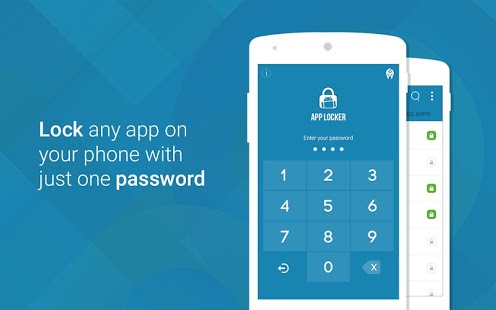
Applock is must have app that every phone user should have to protect personal data from unauthorized access.
All in one app!! Now you can lock your apps/photos/videos/documents with in one app.
While setting a passcode / pattern on your phone can go a long way towards improving the security of your device, it is meaningless in situations where it is already unlocked and an invasive family member or friend decides to read through your messages history or tamper with your on-going Candy Crush Saga game.
Now you can secure individual apps with just one password. And you never have to worry about your privacy while someone is using your phone.
You can lock unlimited number of apps/photos/videos/documents with just one password, so you don’t have to remember multiple passwords.
It has a bunch of awesome features:
- Lock your private messages by locking apps like Whatsapp, SMS, Facebook, Twitter, Emails, Skype, Snapchat, Contacts, etc.
- Lock your sensitive photos and videos
- Lock your important documents
- Lock incoming and outgoing calls.
- Set theme for on your mood.
- Secure your personal notes by locking apps like Wunderlist, Evernote, default notes app etc.
- You can lock unlimited number of apps.
- Only You can access the locked apps by entering the passcode.
- Extremely easy to unlock with just one click.
- With its amazing interface and easy to use features, you will always use this app to protect your personal apps.
- Also protects your apps from getting uninstalled and installed accidentally.
- Built-in offline password recovery.
- Optimized for HD tablets.
- Minimal battery and memory usage.
You no longer have to worry about anyone using your phone.
How it works:
1. Create a 4-digit password.
2. Select the app(s) you want to lock. Press the lock icon.
3. You are done.
4. Now whenever you will open a locked app, all you have to do is enter your 4-digit password.
PASSWORD RECOVERY:
--------------------
In case if you forget your passwords we will send you to your registered e-mail id.
GET_ACCOUNTS permission is get user e-mail id for sending password.
Having issues with Photo & video Locker? Check out the FAQs ( http://www.innorriors.com/faq.php ) or mail us at admin@innorriors.com.
- Follow us! : https://plus.google.com/101200578251750147543
- Love us? Like us! : http://facebook.com/innorriors
- Twitter addict? Follow us : http://twitter.com/innorriors
- Stay updated. Visit us : http://www.innorriors.com
About App locker - Lock Any App
The company that develops App locker - Lock Any App is Innorriors Pvt. Ltd.. The latest version released by its developer is 2.2.1.
To install App locker - Lock Any App on your Android device, just click the green Continue To App button above to start the installation process. The app is listed on our website since 2017-02-13 and was downloaded 0 times. We have already checked if the download link is safe, however for your own protection we recommend that you scan the downloaded app with your antivirus. Your antivirus may detect the App locker - Lock Any App as malware as malware if the download link to inno.applocker is broken.
How to install App locker - Lock Any App on your Android device:
- Click on the Continue To App button on our website. This will redirect you to Google Play.
- Once the App locker - Lock Any App is shown in the Google Play listing of your Android device, you can start its download and installation. Tap on the Install button located below the search bar and to the right of the app icon.
- A pop-up window with the permissions required by App locker - Lock Any App will be shown. Click on Accept to continue the process.
- App locker - Lock Any App will be downloaded onto your device, displaying a progress. Once the download completes, the installation will start and you'll get a notification after the installation is finished.
Program Details
System requirements
Download information
Pricing
Version History
version 2.2.1
posted on 2017-02-13
Version 2.2.1
- Bug fixes
Version 2.2
- Changed lock algorithm
- Fast lock
- Performance improved
- Bug fixes
Version 2.0
- Lock your photos
- Lock your videos
- Lock your Documents
- Themes
- Full external memory support
- Landscape support
- 6.0 (Marshmallow) compatible
- Tablet optimization
- Refreshed interface
- Bug fixes
- Performance improved
Version 1.3.2
- E-mail based password recovery.
- Pattern lock.
- Material based design (Android 'L' UI).
- Bug fixes.
version 2.2
posted on 2016-09-09
Version 2.2,- Changed lock algorithm,- Fast lock,- Performance improved,- Bug fixes,Version 2.0,- Lock your photos,- Lock your videos,- Lock your Documents,- Themes,- Full external memory support,- Landscape support,- 6.0 (Marshmallow) compatible,- Tablet optimization,- Refreshed interface,- Bug fixes,- Performance improved,Version 1.3.2,- E-mail based password recovery.,- Pattern lock.,- Material based design (Android 'L' UI).,- Bug fixes.
version 1.3
posted on 2014-10-14
Several fixes and updates
Disclaimer
External Download
We do not host App locker - Lock Any App on our servers. We did not scan it for viruses, adware, spyware or other type of malware. This app is hosted by Galad and passed their terms and conditions to be listed there. We recommend caution when installing it.
The APK Download link for App locker - Lock Any App is provided to you by apps112.com without any warranties, representations or guarantees of any kind, so access it at your own risk.
If you have questions regarding this particular app contact the publisher directly. For questions about the functionalities of apps112.com contact us.
